
Appearance
Events
Events are scheduled community activities with Discord signups. Use Signup Groups for squads, raid roles, teams, volunteer shifts, vendor slots, or any other roster shape.
Paid feature
Events require Premium or Premium Plus. Saved Events, templates, signups, and reminder settings remain stored but inactive if the server returns to Free.
Create an Event
Create or choose the Discord channel where the Event will be posted, then open Admin Dashboard → Events.
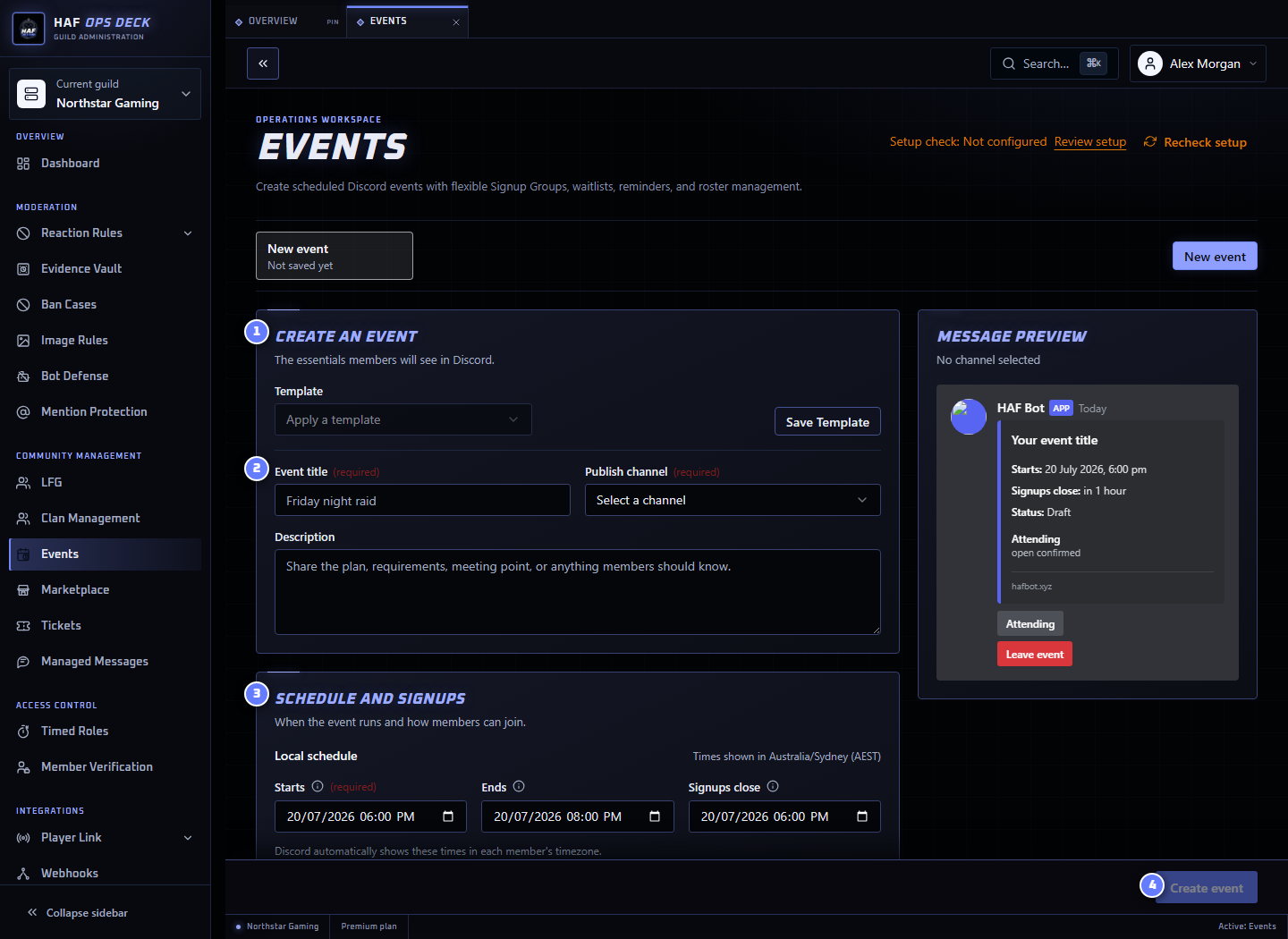
- Create an event — enter new details or start from a saved template.
- Event title — the name members see in Discord.
- Schedule and signups — start, end, signup cutoff, and Signup Groups.
- Create event — saves the Event when the required fields are valid.
To create your first Event:
- Enter the title, description, publish channel, and start time.
- Add an optional end time and signup cutoff.
- Add at least one Signup Group, such as
Attending. - Add a capacity only when the group should be limited.
- Configure an optional thread and reminders.
- Review the Discord preview.
- Save the draft or publish it when ready.
Discord displays Event timestamps in each member's local timezone.
Templates
An Event Template preloads reusable details such as Signup Groups and reminders. Applying a template copies those settings into the Event draft. Editing the template later does not silently change an existing Event.
Publishing and Editing
Publishing creates the Discord Event message. Publishing an already published Event updates the existing message rather than creating a second one.
You can edit a Draft, Scheduled, or Live Event. Saving changes to a published Event refreshes its Discord message. Ended, Cancelled, and Archived Events cannot be edited.
Changing the publish channel after an Event already has a message may require a replacement workflow; confirm the resulting Discord message before announcing the change.
Signup Groups
Each Signup Group can have:
- a label and optional emoji;
- an optional capacity;
- an optional waitlist;
- allowed and blocked Discord roles; and
- an optional role granted to confirmed members.
In single choice mode, joining another group removes the member from their previous group. In multi-choice mode, a member can join more than one group.
Members can join or change signups while the Event is Scheduled or Live and before the signup cutoff. After the cutoff, HAF rejects new signup changes.
Waitlists
When a capped group is full:
- new members join its waitlist when waitlisting is enabled; or
- HAF reports that the group is full when waitlisting is disabled.
When a confirmed member leaves or is removed, HAF promotes the next waitlisted signup. Promotion updates the Event message and applies the confirmed member's role and thread access.
HAF does not currently send a separate DM for waitlist promotion.
Event Threads
An Event can create a Discord thread from its published message.
Confirmed members are added to the thread. Waitlisted members are added only when Waitlisted members join thread is enabled.
Leaving a group removes the member from the thread when they no longer have a confirmed signup that requires access.
Granted Roles
A Signup Group can grant a Discord role to confirmed members. HAF Bot's highest role must be above that role.
HAF removes the granted role when:
- the member leaves the group;
- an organizer removes or changes the signup;
- the Event is cancelled; or
- the Event reaches its configured end time.
Archiving is only available after an Event has ended or been cancelled, so role cleanup has already occurred.
Reminders
Reminders are sent to the Event channel, or to the Event thread when one exists. HAF does not send Event reminders by DM.
A reminder can target:
- a public channel or thread reminder without member mentions;
- confirmed signups;
- waitlisted members;
- confirmed members in selected Signup Groups; or
- the Not signed up audience.
Confirmed, waitlisted, and selected-group reminders directly mention the matching members. Public reminders do not mention anyone.
The current Not signed up option also posts an unmentioned public reminder. It does not calculate or mention every server member who has not signed up.
Reminder timing is set as a number of minutes before the Event start. Each configured reminder is sent once.
Lifecycle
| State | Meaning |
|---|---|
| Draft | Saved in the dashboard but not published |
| Scheduled | Published and waiting for the start time |
| Live | The start time has passed |
| Ended | The end time has passed and confirmed role/thread access has been cleaned up |
| Cancelled | Closed early by an organizer and confirmed role/thread access has been cleaned up |
| Archived | Hidden from active organizer workflows after ending or cancellation |
Events without an end time remain Live until an organizer cancels them.
Current Limitations
- Recurring Events are not supported; create another Event or use a template.
- Captain-managed or proxy signup is not part of the member flow.
- The Not signed up reminder currently behaves like an unmentioned public reminder rather than identifying non-signups.
Use Setup check after saving to inspect saved publish channels and optional thread permissions. It does not publish an Event or submit a signup.