
Appearance
Image Rules
Image Rules checks Discord image attachments against a topic you define. It can allow the message, send it for moderator review, or delete it when the image is clearly off-topic.
Paid feature
Image Rules requires Premium or Premium Plus.
Data Handling
For each supported attachment, HAF sends the following to the configured external image-classification API:
- the Discord attachment URL; and
- the server's topic description.
The classifier returns a short image description, a reason, and on-topic/off-topic confidence scores.
HAF stores classification metadata for audit events. For uncertain images, it also stores the Discord image URL and review status in the Mod Queue. The current retention period for these records should be confirmed in HAF's privacy and retention documentation.
Supported Images
Image Rules checks Discord message attachments with these content types:
- PNG
- JPEG
- WebP
- GIF
By default, attachments larger than 20 MiB or wider/taller than 4096 pixels are skipped. These limits can differ by deployment.
Image links in message text, website embeds, videos, and unsupported attachment types are not classified. When a message has several supported images, HAF uses the most severe result for the whole message.
Safe First-Time Setup
Create or choose a private Mod Queue and moderator role, then open Admin Dashboard → Image Rules.
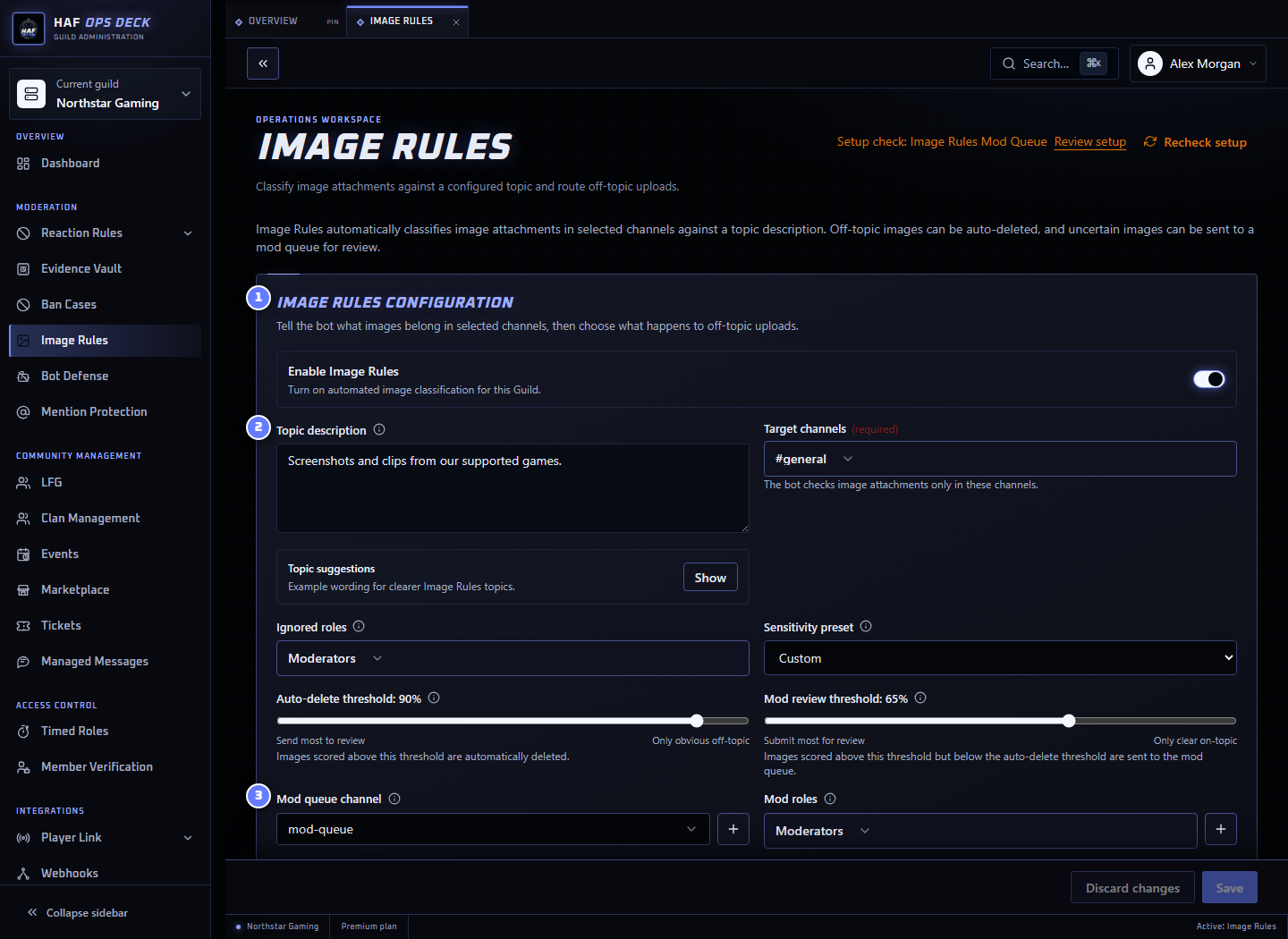
- Image Rules configuration — enables the feature and controls its scope.
- Topic description — describes what belongs in the selected channels.
- Mod Queue channel — where uncertain images are reviewed.
To roll it out safely:
- Select target channels and any excluded roles.
- Choose the private Mod Queue and review roles.
- Describe acceptable images with concrete examples.
- Keep the initial sensitivity preset.
- Enable Dry run mode and save.
- Post clearly acceptable, clearly unacceptable, and borderline test images.
- Review the audit results and adjust the topic or thresholds.
- Disable Dry run only after staff agree the results are reliable.
Verdicts and Thresholds
The classifier returns an off-topic confidence from 0 to 1.
- At or above the Auto-delete threshold: Off-Topic
- At or above the Mod review threshold, but below auto-delete: Uncertain
- Below the Mod review threshold: On-Topic
Example with review 0.60 and auto-delete 0.85:
| Off-topic confidence | Verdict | Normal-mode result |
|---|---|---|
0.40 | On-Topic | Message remains |
0.72 | Uncertain | Message is removed and queued for review |
0.91 | Off-Topic | Message is deleted and audited |
The Mod review threshold should be lower than or equal to the Auto-delete threshold.
On-Topic Images
On-topic messages remain visible. HAF can optionally:
- add a ✅ reaction; and
- write an On-Topic Image Classified event to the Guild Audit Log.
Off-Topic Images
In normal mode, HAF deletes the whole Discord message and attempts to DM the author with the configured topic and the reason that one or more images were off-topic.
The audit event can include the deleted message text, author, channel, image URL, confidence scores, image description, and classification reason.
If the member has DMs disabled, deletion and audit logging still continue.
Uncertain Images and Mod Queue
In normal mode, HAF deletes the original message, attempts to DM the author, and creates a Mod Queue item.
Reviewers can choose:
- Approve Deletion — the original message remains deleted.
- Restore Message — HAF posts a new bot-authored message in the original channel.
What Restore Message actually restores
Discord does not allow HAF to recreate the original message under the member's identity.
The restored message:
- is authored by HAF Bot;
- identifies the original author and moderator;
- includes the original message ID;
- embeds the stored image URL; and
- does not restore the original message text or original authorship.
If Discord can no longer access the image URL or HAF cannot post in the original channel, restoration fails and the queue records the failure. HAF attempts to DM the author with the review outcome.
Restore attempts acquire a durable, expiring D1 claim before posting while leaving the queue status rollback-compatible. A recovered attempt checks Discord message history for the stable restore nonce or legacy restore marker before reposting, so recovery does not depend on Discord's short nonce-retention window. The original moderator remains attached to the operation across recovery. Definitive Discord failures produce a terminal Restore Failed result; ambiguous provider responses remain in progress and can be safely recovered after the claim expires. Restore is briefly unavailable for five minutes after the additive migration so requests running the previous Worker version can drain before claims activate. Existing Image Rules rows need no data backfill.
Dry Run Mode
Dry Run classifies and audits without taking member-facing action. It does not:
- delete messages;
- DM members;
- create Mod Queue items;
- ping review roles; or
- add the on-topic reaction.
Dry-run audit entries show what HAF would have allowed, queued, or deleted.
Writing a Good Topic
Describe what belongs rather than only listing what is banned. Include likely edge cases.
DayZ example:
text
Screenshots of DayZ gameplay, including first-person or third-person scenes, bases, inventories, maps, vehicles, characters, combat, UI/HUD, and server moments. Desktop screenshots are allowed when DayZ gameplay, menus, or other DayZ-related content is visible.PC desktop example:
text
Screenshots from a PC desktop, including Windows desktops, taskbars, icons, application windows, terminals, browsers, settings, launchers, and wallpapers.Setup Check
After saving, use Setup check to inspect target channels, the Mod Queue, review roles, and Discord permissions. It does not download or classify an image and does not bypass Dry Run.