
Appearance
Marketplace
Marketplace is a member-run trade board for gaming communities. HAF organises listings and introductions; it does not verify items, prices, ownership, delivery, or whether a trade is safe.
Set Up Marketplace
Open Admin Dashboard → Marketplace.
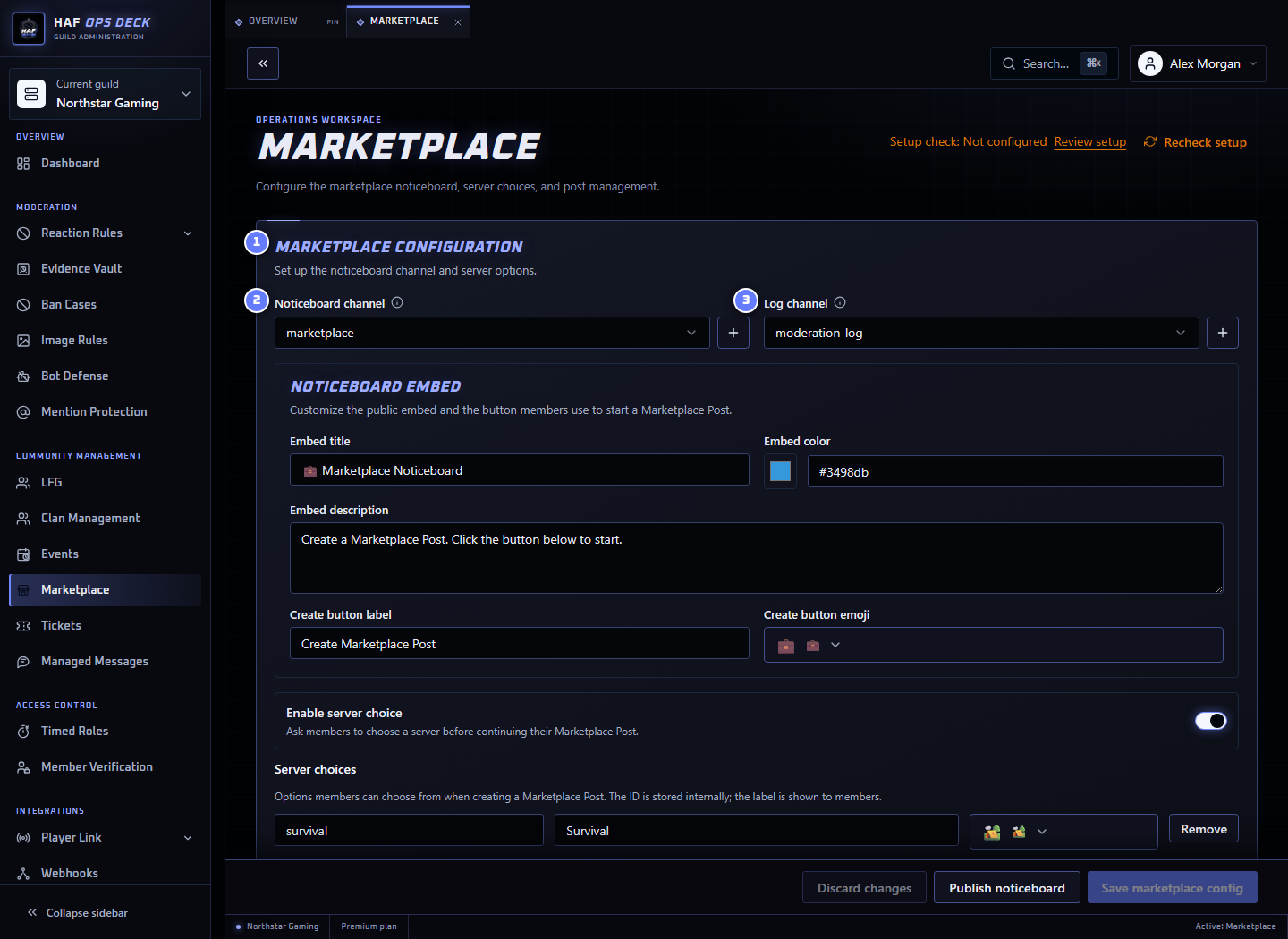
- Marketplace configuration — member flow and noticeboard settings.
- Noticeboard channel — where members create and browse listings.
- Log channel — where staff review trade-interest events and DM delivery failures.
To set it up:
- Choose or create the noticeboard channel.
- Choose an optional private staff log channel.
- Decide whether members must select a game server.
- Add any additional category or listing choices.
- Customize the noticeboard title, description, colour, and button.
- Save the configuration.
- Select Publish noticeboard.
Test with two non-admin accounts: create a harmless listing, express interest from the second account, confirm the owner receives a DM, then close the listing.
Member Flow
Create a listing
Members select the noticeboard button and provide:
- whether they have something or want something;
- a game server, when enabled;
- each additional choice configured by staff;
- what they have;
- what they want; and
- optional extra information.
A member can have one active Marketplace post at a time. They must close it before creating another.
Express interest
When another member selects the trade-interest action:
- HAF sends the listing owner a DM identifying the interested Discord member and the listing.
- HAF records whether the DM was delivered.
- HAF writes the event to the configured Marketplace log channel or Guild Audit Log destination.
HAF does not reveal an email address, payment account, or external contact details. Members continue the conversation through Discord using the identity shown in the DM.
If the owner has DMs disabled, HAF records the delivery failure for staff but cannot complete the introduction by DM.
Close a listing
The listing owner closes the post when the trade is finished or no longer available. Staff can also close active posts from the dashboard.
Marketplace posts do not currently expire or renew automatically. They stay active until the owner or staff closes them.
Additional Choice Steps
Admins can add up to 10 ordered choice steps with up to 25 options in each step.
Example for a DayZ trade board:
- Map — Chernarus, Livonia, Namalsk
- Listing type — Weapon, Vehicle, Building supplies, Clothing
- Trade location — Safe zone, Buyer travels, Seller travels
Members must complete every enabled choice step. If staff change the flow while a member is creating a listing, HAF asks them to start again so the saved listing matches the current options.
Trade Logging
A trade-interest log records:
- the interested member and listing owner;
- the Marketplace post and Discord channel;
- the trade type and selected server;
- the listing's have and want values; and
- whether the owner DM succeeded or failed.
A log records an introduction, not proof that a trade occurred.
Setup Check
After saving, use Setup check to inspect the noticeboard, log channel, and Discord permissions. It does not publish the noticeboard, create a listing, or send a member DM.
The noticeboard and private log channel can be created or reused from the feature page. Publishing remains a separate action.