
Appearance
Evidence Vault
Evidence Vault lets authorised staff remove sensitive Discord messages from public view and store a staff-only record with audit logging.
Evidence images use short-lived links issued only after the See Evidence interaction confirms Guild access. Each link is scoped to one image, expires after ten minutes, and is served with private, no-store headers. Stored legacy image URLs are never rendered.
Available on every plan
Free includes the full workflow for up to 30 records. Paid plans have no HAF plan limit on record count. Managed storage limits still apply.
What Hide Evidence Does
When authorised staff select Apps → Hide Evidence on a Discord message, HAF:
- saves the message text, links, author, timestamp, and supported image attachments;
- scans the saved text for configured subject identifiers when Subjects are enabled;
- deletes the original Discord message;
- posts a placeholder in the original channel; and
- writes an audit event.
If the evidence is saved but Discord will not allow HAF to delete the original message, the record is marked source-delete-failed and staff are told to delete the message manually.
If the placeholder cannot be posted, the evidence remains saved and the record is marked placeholder-post-failed.
Configure Staff Access
Create or choose a private audit channel and the staff roles that should use the vault. Then open Admin Dashboard → Evidence Vault.
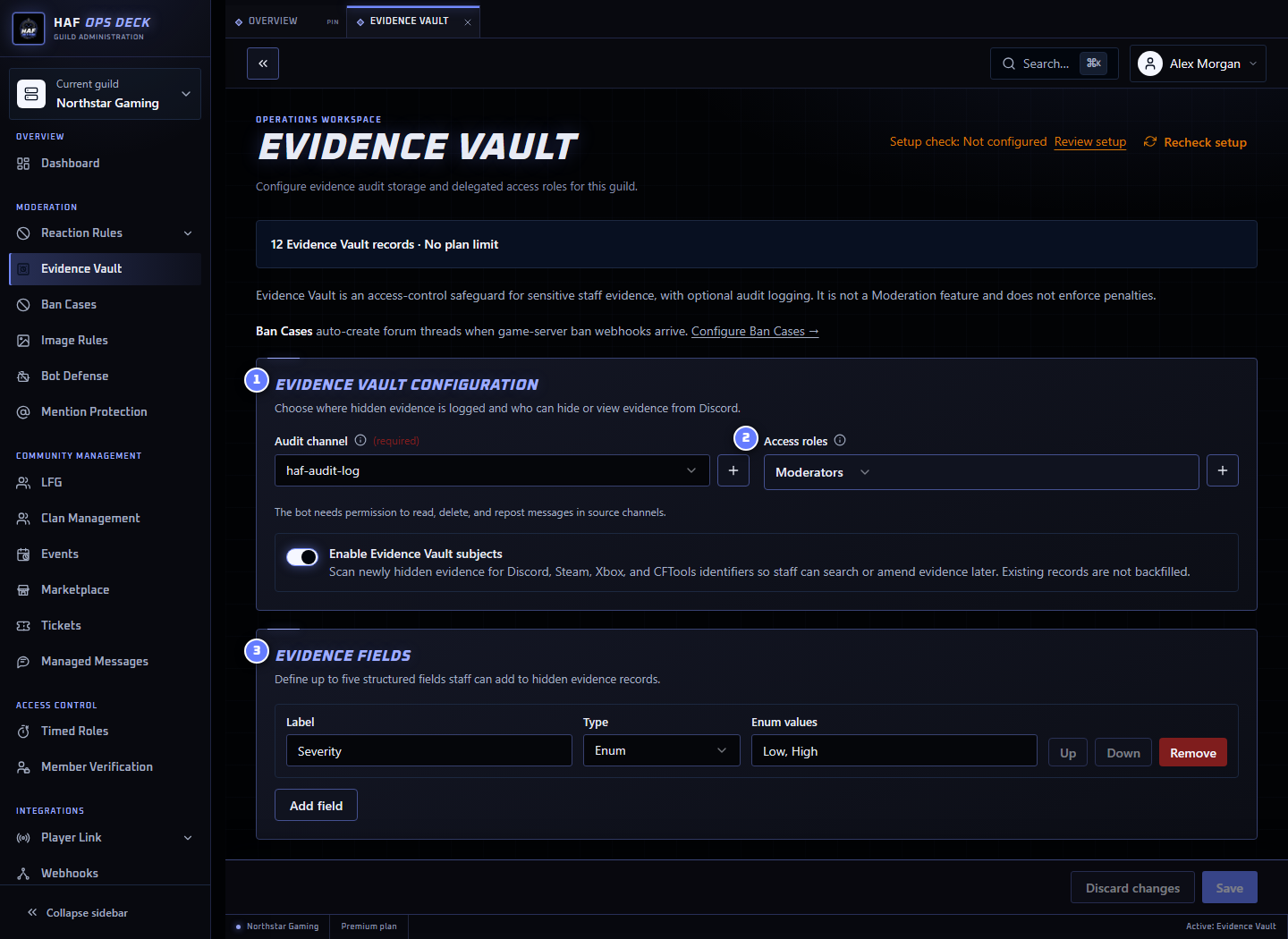
- Evidence Vault configuration — audit destination and access settings.
- Access roles — members with any selected role may hide and view records.
- Evidence Fields — optional structured fields added to records.
To configure it:
- Choose the private audit channel.
- Select one or more staff access roles, or leave the list empty for Guild admins only.
- Enable Subjects when staff need to find records by player or account identifiers.
- Add only Evidence Fields staff will use consistently.
- Save the configuration.
HAF needs permission to read, delete, and repost messages in source channels.
What Is Stored
Each record can contain:
- up to 1,500 characters of message text;
- up to 20 detected HTTP links;
- source author, channel, message ID, and timestamp;
- the staff member who hid it and the time it was hidden;
- up to four supported image attachments;
- detected or manually amended subjects; and
- up to five configured Evidence Field values.
Supported stored images are limited to 8 MiB each and 20 MiB combined per record.
Images are copied into HAF-managed object storage so the record does not rely only on the original Discord attachment remaining available.
Subjects and Search
When Subjects are enabled, newly hidden evidence is scanned locally against configured identifier patterns. Existing records are not scanned automatically after the feature is enabled.
Supported default identifiers include:
- Discord mentions and IDs;
- SteamID64 values and Steam profile URLs;
- Xbox XUIDs;
- PlayStation IDs; and
- CFTools profile URLs.
Authorised staff can search by subject, source text, or configured Evidence Fields:
text
/evidence-vault searchSearch is limited to the current Discord server, returns newer records first, and is audit logged.
Use /evidence-vault amend to add or remove a subject when automatic scanning missed an identifier or matched an unrelated reference.
Evidence Fields
Admins can configure up to five fields:
- short text;
- long text; or
- a fixed list of values.
Use them for stable server-specific data such as case ID, character name, region, category, or investigation state.
Removing a configured list value does not erase it from older records. It remains in the archived record metadata but no longer matches the current field definition.
Access Control
Evidence Vault access is granted to:
- members with Discord Administrator or Manage Guild; and
- members holding at least one configured Evidence Vault access role.
Removing an access role immediately removes the permission granted by that role. It does not delete records created or viewed by those members.
If no access roles are configured, only Guild admins can hide, search, or view evidence.
Audit Logging
HAF writes audit events for allowed and denied hide attempts, searches, subject changes, and record views. Viewing the same record is rate limited to approximately once per minute per authorised user, and denied or rate-limited access attempts can also be audited.
The audit channel is required. Keep it private because entries identify staff, source members, and evidence records.
Limits
| Tier | Records | Managed storage per server |
|---|---|---|
| Free | 30 | 100 MB |
| Premium | No plan limit | 1 GB |
| Premium Plus | No plan limit | 1 GB |
When the record limit is reached, existing evidence remains available but HAF refuses new Hide Evidence actions. When a new record's images would exceed managed storage, HAF refuses the action before deleting the original message.
Record deletion and retention
The current customer workflow does not expose a record-delete or bulk-export action. A formal retention period and administrative deletion process still need to be defined. Do not promise automatic expiry or self-service deletion until those product rules are implemented.
Test the Workflow
Use an authorised staff account to hide a harmless message. Confirm:
- the original message is deleted;
- a placeholder appears;
- the record can be opened by authorised staff;
- the audit event arrives; and
- an ordinary member cannot view the record.
After saving, use Setup check to inspect the audit channel, access roles, and required permissions. It does not hide a message or create a record.