
Appearance
Guild Audit Log
Guild Audit Log sends HAF workflow events and selected Discord events to private staff channels.
Use it when moderators need a shared record of what changed, who acted, and where the event occurred.
Configure the Audit Destination
Create or choose a private staff channel, then open Admin Dashboard → Guild Audit Log.
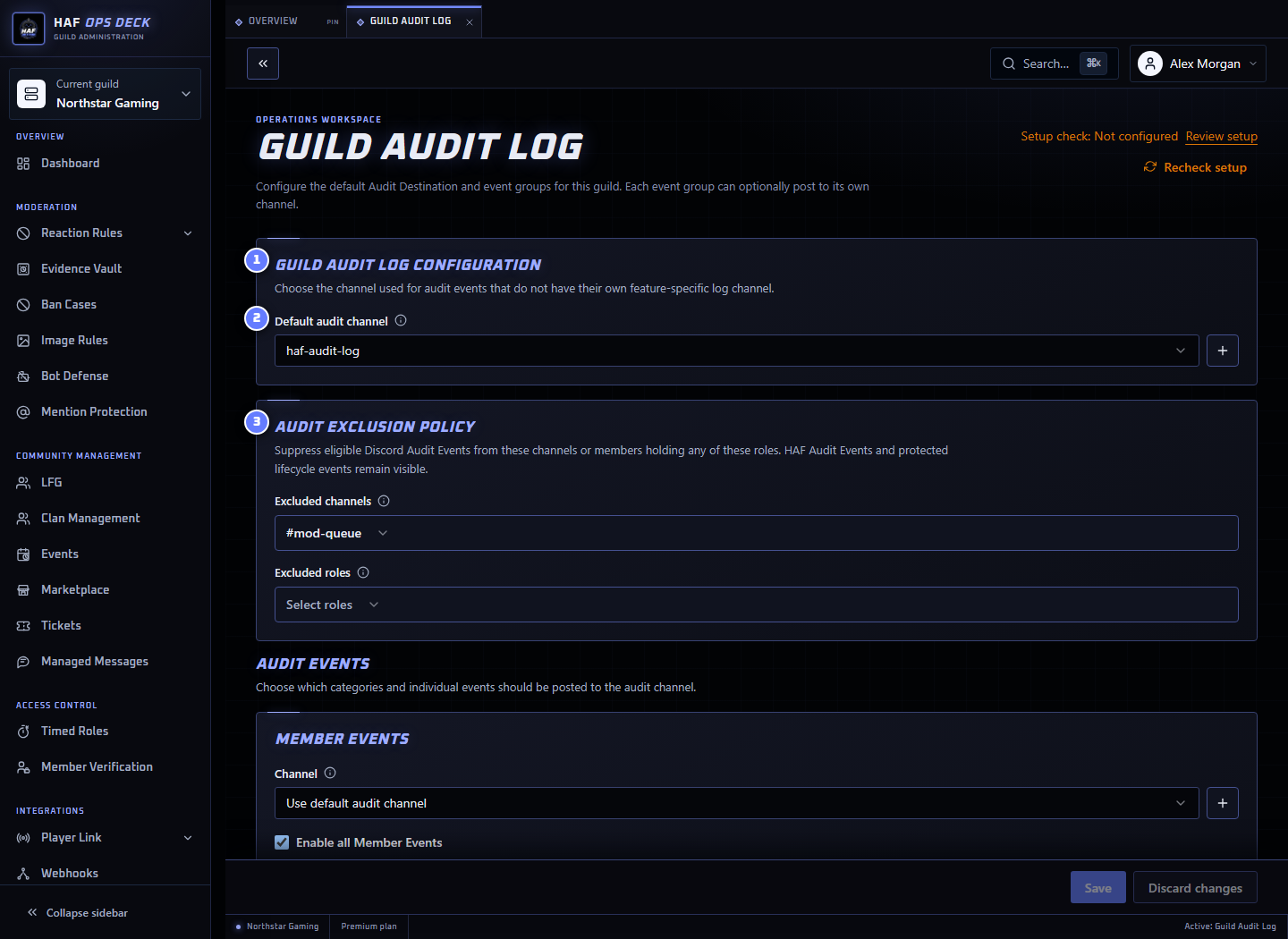
- Guild Audit Log configuration — default destination and event routing.
- Default audit channel — receives enabled events without a separate group destination.
- Audit Exclusion Policy — suppresses eligible Discord events from selected channels or roles.
Recommended setup:
- Select one default private audit channel.
- Leave group-specific channels empty unless staff genuinely need separate destinations.
- Review enabled event groups and individual overrides.
- Add exclusions only for channels or roles whose routine activity would create noise.
- Save the configuration.
- Generate one harmless event and confirm it reaches the expected channel.
Event Groups
The dashboard groups events so they can be enabled, disabled, or routed together.
| Group | Examples |
|---|---|
| Members | Join, leave, nickname change, role add/remove, ban, unban |
| Messages | Message edit and deletion |
| Guild structure | Invite creation and channel create/update/delete |
| Identity and verification | Player links and Member Verification results |
| Moderation | Reaction Rules, Image Rules, Bot Defense, Mention Protection |
| Cases and evidence | Evidence Vault access and changes, Ban Cases |
| Community workflows | Clan Management, Events, Tickets where supported |
| Automation | Timed Roles, Managed Messages, Player Count failures |
| Resource setup | HAF-created or repaired feature resources |
The dashboard is the current source of truth for the complete event list because new feature events can be added over time.
Event Routing
For each enabled event:
- HAF uses the event group's dedicated channel when one is configured.
- Otherwise it uses the default audit channel.
- When neither destination is available, the event is not posted to Discord.
Disabling a group turns off its ordinary events unless an individual event has an explicit override.
Exclusion Policy
Channel and role exclusions apply with OR behavior: a known channel match or a known current-role match suppresses the eligible Discord event.
Example:
- Exclude
#staff-chat. - Exclude the
Integration Botrole. - Message edits in
#staff-chatare omitted regardless of author. - Eligible message events by a member currently holding
Integration Botare omitted in other channels.
Channel exclusions cover message edits, message deletions, and invite creation. Threads and Forum posts inherit an excluded parent channel.
Role exclusions cover attributable message edits/deletions, nickname changes, and role assignment/removal. Role-change checks use the member's roles after the event.
The following remain visible even when exclusions are configured:
- member join, leave, ban, and unban;
- channel create, update, and delete; and
- HAF workflow audit events.
When Discord does not provide enough channel, parent, actor, or role data to prove an exclusion match, HAF keeps the event visible.
Every exclusion-policy change is itself audited with the acting admin and the IDs added or removed.
What Is Stored
Guild Audit Log posts embeds into Discord. HAF stores the routing configuration, but it does not provide a separate searchable copy of all posted audit events.
Retention therefore follows the Discord channels and the server's own message-retention practices. Deleting an audit message or channel can remove the only staff-visible copy of that event.
Features such as Evidence Vault may store their own underlying records separately; the audit embed is not the record itself.
Troubleshooting
If an expected event is missing:
- Confirm the event group and individual event are enabled.
- Check whether a group-specific destination overrides the default channel.
- Review channel and role exclusions.
- Confirm HAF can view the destination and send messages and embeds.
- Run Setup check.
Setup check validates the saved default destination and Discord access. It does not generate a test event.
HAF-created audit channels are private to Guild administrators and HAF until their Discord permissions are deliberately expanded.