
Appearance
LFG (Looking For Group)
LFG gives members a noticeboard for finding teammates without staff coordinating every group.
Set Up LFG
Open Admin Dashboard → LFG.
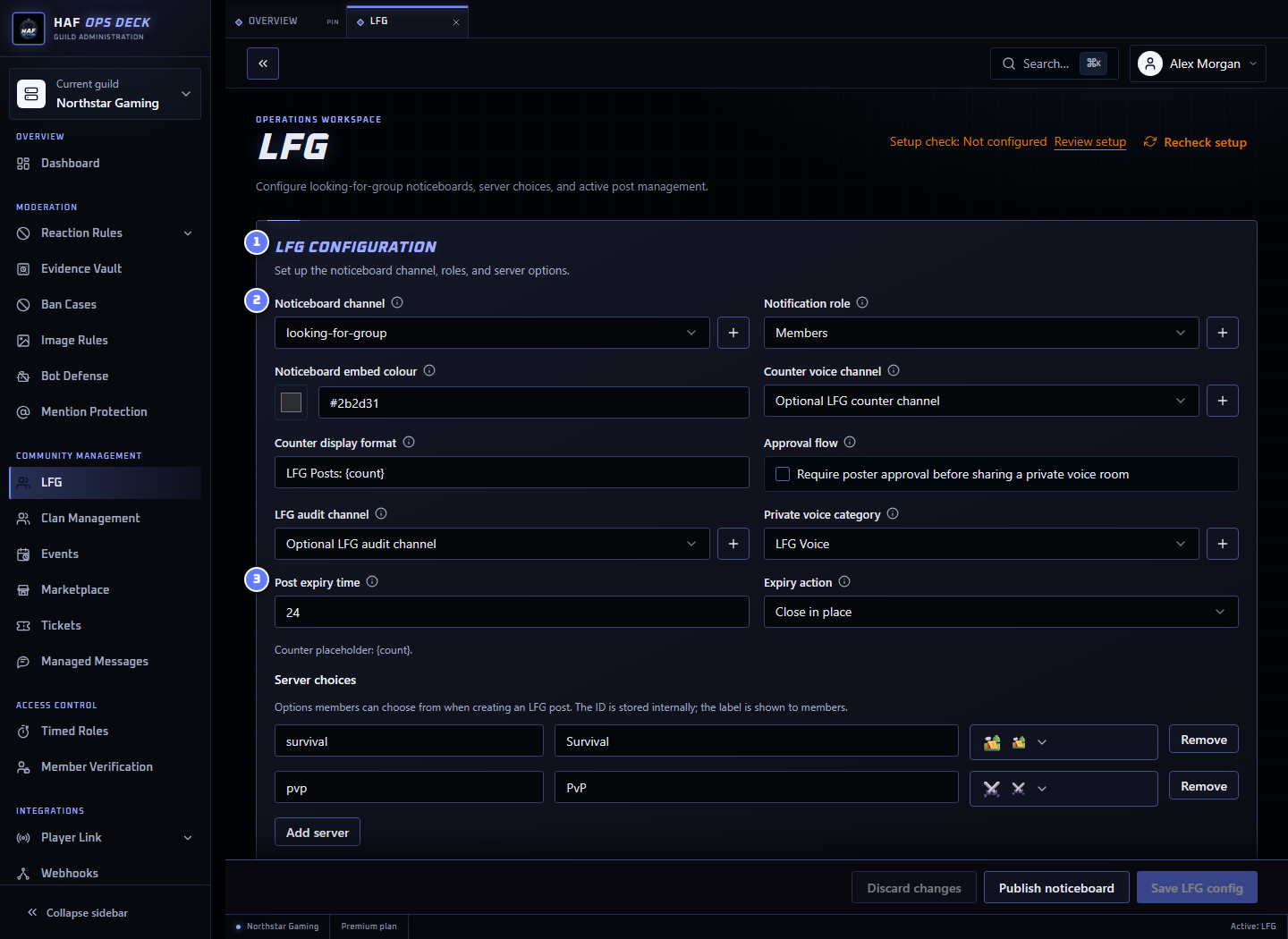
- LFG configuration — noticeboard, alerts, server choices, approval, and voice-room settings.
- Noticeboard channel — where members create and browse LFG posts.
- Post expiry time — how long posts stay active before the selected expiry action.
To set it up:
- Choose or create the noticeboard channel.
- Add the game servers or activities members may select.
- Optionally configure an LFG alert role and active-post counter channel.
- Choose whether interested members need approval.
- If approval is enabled, choose the private voice category and optional audit channel.
- Set the post lifetime from 1 to 168 hours and choose the expiry action.
- Save the configuration.
- Select Publish noticeboard.
Test from a non-admin account by creating, editing, renewing, and closing a harmless post.
Member Flow
Create a post
Members select Create LFG Post and provide:
- the configured server or activity;
- when they want to play;
- what they are looking for; and
- any extra information.
A member can have one active public LFG post at a time. The original poster can edit, renew, or close it.
Express interest without approval
When approval is off, selecting the interest action notifies the original poster by DM. HAF does not automatically choose group members.
If the poster has DMs disabled, the notification may not be delivered. Members should still use the details in the post and the server's normal contact rules.
Apply with poster approval
When Approval flow is enabled:
- The interested member submits a short application message.
- HAF DMs the original poster with Accept and Reject controls.
- Only the original poster can decide the application.
- HAF DMs the applicant with the result.
- Accepted members gain access to the post's private voice room when a voice category is configured.
An applicant cannot submit a second pending application or reapply after rejection. Application decisions and private-room actions can be sent to the configured LFG audit channel.
Private Voice Rooms
With Approval flow and a private voice category configured, HAF creates one temporary voice room for the post when the first member is accepted.
The room is visible to:
- the original poster;
- accepted applicants; and
- members who already have administrator access through Discord.
Accepting more applicants updates access to the same room. Closing or expiring the LFG post removes the temporary room.
Clan-only LFG uses the Clan's existing private text and voice channels instead of creating a temporary room.
Alerts and Active-Post Counter
An optional notification role adds a Join / Leave LFG Alerts button to the noticeboard. New public LFG posts can mention that role.
An optional counter voice channel shows the number of active posts. Use {count} in its name format, for example:
text
LFG ({count})Discord limits how often channel names can change, so counter updates may be delayed by several minutes.
Expiry and Renewal
Posts can stay active for 1 to 168 hours.
| Expiry action | Result |
|---|---|
| Close in place | Marks the post closed and leaves the message visible |
| Delete message | Closes the post and removes its Discord message |
| Leave alone | Makes no automatic change when the expiry time passes |
The original poster can renew an active post. Each renewal adds another full configured lifetime to the existing expiry time. HAF may DM the owner a renewal reminder; closed DMs can prevent delivery.
Staff Controls
The dashboard lists recent posts and lets admins close an active post. Closing a post also removes its temporary private voice room.
Use Setup check after saving to inspect the saved channels, category, roles, and permissions. It does not publish the noticeboard, create a post, send an application, or create a voice room.