
Appearance
Webhooks
Webhooks give an external service a HAF URL, then forward the received body to one or more Discord webhook destinations.
Public requests are admitted before configuration lookup or rule evaluation. HAF Bot applies byte limits (256 KiB for Webhook Proxy), accepted text media types, durable per-source and global traffic limits, and a 60-second exact-duplicate window. Discord destination URLs are credentials: only official Discord webhook forms are accepted, and tokens must not appear in ordinary configuration, Queue, log, or support representations.
Paid feature
Webhooks require Premium or Premium Plus.
Create a Webhook Proxy
Open Admin Dashboard → Webhooks. Create the destination Discord webhooks first and keep their URLs ready.
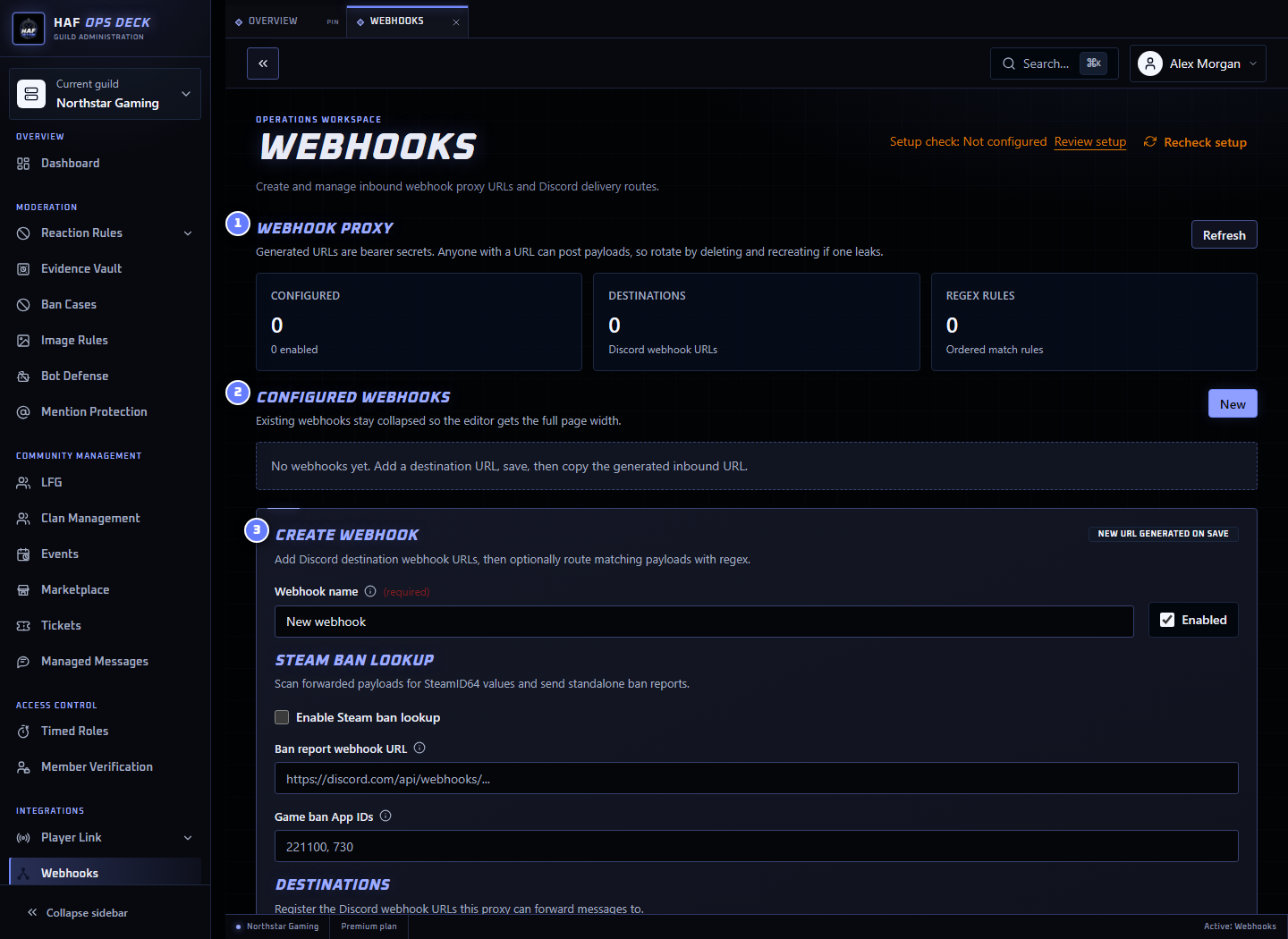
- Webhook proxy summary — configured proxies, destinations, and routing rules.
- Configured webhooks — existing inbound URLs and whether they are enabled.
- Create webhook — name, destinations, fallback routing, replacements, and regex rules.
To create a proxy:
- Add between 1 and 25 named HTTPS destination URLs.
- Select at least one default destination.
- Add routing rules only when different bodies need different destinations.
- Add content replacements only when the forwarded body needs to be changed.
- Use Test configuration with a fictional representative payload.
- Save the proxy.
- Copy the generated HAF URL into the external service.
- Send one harmless live payload and inspect Delivery Logs.
Inbound Requests
External services send the payload with an HTTP POST to the generated URL.
HAF accepts JSON or plain-text bodies. The inbound Content-Type is forwarded to the destination. Invalid JSON sent with an application/json content type is rejected during processing.
A successful inbound acceptance returns HTTP 204 No Content. This means HAF accepted the request for forwarding; it does not prove every destination delivered successfully.
HAF also answers GET, HEAD, and OPTIONS probes so providers can check that the endpoint is reachable before enabling delivery.
URL Security
Treat the generated HAF URL as a secret. Anyone who has it can submit a payload while the proxy is enabled and the server has paid access.
The current proxy does not validate inbound signature headers, bearer tokens, or a separate shared secret. Request headers are not forwarded to the Discord destination; only the body and content type are forwarded.
To revoke an exposed URL, delete the webhook configuration. Its existing inbound URL stops working. Create a new webhook to receive a new URL, then update the external sender.
Do not paste inbound URLs or Discord webhook destination URLs into public channels, screenshots, issue reports, or logs.
Routing Rules
Each rule contains a JavaScript-compatible regex and one or more destination IDs.
- HAF applies content replacements before routing.
- Every matching rule contributes its destinations.
- Duplicate destinations are sent only once.
- Default destinations are used only when no routing rule matches.
- A proxy can have up to 25 routing rules.
Example payload:
json
{
  "event": "player_banned",
  "player": "76561198000000000",
  "reason": "Cheating"
}
Example rule:
text
Pattern: "event"\s*:\s*"player_banned"
Flags: i
Destination: ban-log
The payload matches the rule and is forwarded to ban-log. When no rule matches, it goes to the configured default destination instead.
Content Replacements
A proxy can apply up to 25 regex replacements before routing and delivery.
For plain text, replacements run across the body in configured order.
For JSON, HAF parses the body and applies replacements to every string value while leaving numbers, booleans, object keys, and structure unchanged. It then serialises the transformed JSON before routing and forwarding.
Example:
text
Pattern: 192\.0\.2\.\d+
Replacement: [redacted IP]
Flags: g
Use the local tester to confirm the transformed body before connecting live traffic.
Steam ID Extraction
When Steam ban lookups are enabled, HAF scans the transformed body for SteamID64 values. It can queue those IDs for the configured Steam ban lookup notification workflow in batches of up to 100.
This extraction is separate from routing. It does not remove Steam IDs from the forwarded body unless a content replacement does so.
Delivery and Retries
HAF forwards to each selected destination with HTTP POST.
- Destination responses from
200to299are successful. 408,429, and5xxresponses are retryable.- Other
4xxresponses are treated as rejected by the destination. - Network failures are retryable.
- Each delivery run makes up to five attempts, with backoff and
Retry-Aftersupport for rate limits. - Retryable failures may be rescheduled by the delivery queue.
Deleting or disabling a proxy stops new inbound deliveries. A server returning to Free also stops webhook processing.
Delivery Logs
Delivery Logs show:
- time;
- destination label and redacted destination origin;
- response status;
- attempt number; and
- a short error message.
HAF does not store the forwarded body in these delivery-log records. The retention period for delivery logs is not currently defined in the customer documentation.
Limits and Current Gaps
- 1 to 25 destinations per proxy
- Up to 25 routing rules
- Up to 25 content replacements
- HTTPS destination URLs only
Request authentication and limits
The generated URL is currently the only inbound authentication. Signature verification, header forwarding, a documented payload-size limit, and a delivery-log retention policy are not currently exposed as configurable product features.
Setup Check
After saving, Setup check validates stored destination URLs and routing regexes without contacting the sender or destination. It does not prove external reachability.
Use Test configuration for body transformation and routing, then send a harmless live payload to confirm end-to-end delivery.